Need help from us?
 Information Counter
(within opening hours only)
 3917-2914
(within opening hours only)
 Make an appointment
(eligible for HKU academic staff and postgraduate students only)
Borrowing and Returning Books
Q: How many books can I borrow from the Libraries? And for how many days?
A: You can find the borrowing privileges for UG and PG students on our website.
Q: Where can I find the core textbooks used in my courses?
A: Core textbooks are typically placed in our Reserve Collection at the request of instructors. This collection is located behind the Law Library's counter. Due to high demand from students, we offer short loan periods of 3 hours, 1 day, 2 days, and 7 days for these materials to ensure equitable access for all.
Q: Can I return a Main Library book to the Law Library?
A: Yes, you can return all materials borrowed from the HKU Libraries to the Law Library.
Q: I have borrowed an HKALL book. Where can I return it?
A: Please return all HKALL books at the counter, as they cannot be returned via the Self-Check Station or the bookdrop outside the Law Library. Please also note that the counter will be closed 30 minutes before the library closing time.
Q: The book I borrowed will be due soon, but I cannot visit the Library in person. Can my friend return it for me?
A: You don't need to return loaned items in person. If you are unable to return the item yourself, you can get someone else to return it for you using the automatic book drop located outside the Law Library.
Q: I have requested a Main Library book to be picked up at the Law Library. Why can't I find it on the hold shelf opposite the Information Counter?
A: When your requested item is placed on the hold shelf and is ready for pickup, you will receive a notification from the HKU Libraries. Please collect your item AFTER you have received the email notification.
If the requested item is not from HKU Libraries but is delivered from other universities via HKALL or requested through the Inter-Library Loan Service (ILL), please approach the counter for retrieval and borrowing.
Q: I requested a book from the Main Library to be picked up at the Law Library, but I could not find it on the hold shelf on the 8th day since receiving the notification email. Why is that?
A: Your requested book is no longer available for pick-up because all items on hold are kept for 7 days only at the selected pick-up location. Unclaimed items will be returned to the owning library after this period. For more information, please refer to our interbranch services policy and hold and recall policy.
Q: In FIND@HKUL, it shows that a book is available at the Law Library, but I cannot find it on the bookshelf. Why is that?
A: Please check the book status under "Location" to see if it is currently on loan. If the status indicates "item in place" but the book is not on the shelf, feel free to approach our Information Counter for assistance.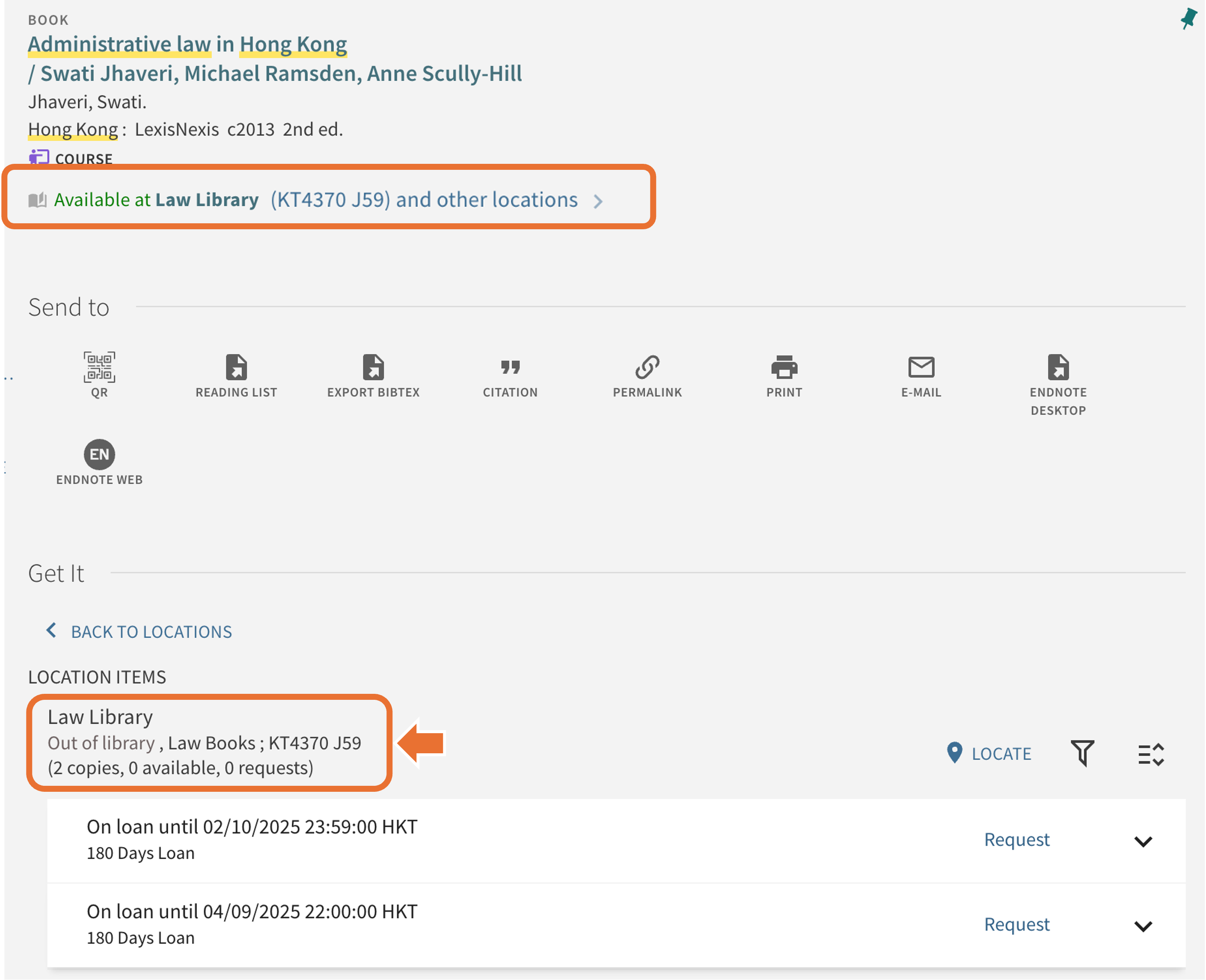
Printing
Q: Can I print from my own laptop?
A: Yes, you can. You have two options:
1. Upload your file(s) using the Web Printing function (maximum file size: 10 MB).
2. Install the uPrint Client programme on your laptop.
Please be reminded that you are required to connect with HKU WiFi when using the uPrint Client. For more details, visit the University's Information Technology Services website.
Lost and Found
Q: I left my charger at the Law Library. What should I do?
A: Lost items found in the Law Library are kept at the Information Counter. Please check with library staff at the counter in person. Claims should be made as soon as possible. Unclaimed items will be transferred to the HKU Lost & Found Office after two weeks.
Databases
Q: Can I access databases remotely from home? How do I do that?
A: Yes, you can! To access databases remotely, simply click on any database's online access link. You will be directed to HKUL Authentication page (as shown below). Enter your HKU Portal UID and PIN, and you will be directed to the landing page of the selected database.

Q: When I click on the database access link, I receive an access denied message. What should I do?
A: If you encounter an access denied message, try clearing your browser's cache and browsing history, or using a different browser to access the link again.
If the issue persists, please email us at Email-A-Librarian (To: Law Library) for assistance.
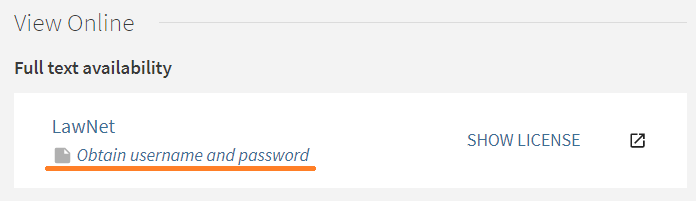
Q: I have tried to access a database, but it requires me to login again after using my HKU Portal account. What's going on?
A: For certain databases, such as LawNet, eLaw.my, and Manupatra, a separate login is required in additional to HKUL Authentication. You can find the username and password in their FIND@HKUL records (as shown below) to obtain the username and password.
Library Policies
Q: I forgot my student/library card. Can I still enter the Law Library?
A: To enter the library, you must bring your own student/ library card (please see L2 of Library Regulations). Please DO NOT enter with any card that is not issued in your name.
If you forgot your card, please press the intercom button on the wooden pole for assistance.
If you have lost your student/ library card, please report to the Main Library's Enquiries Counter on the 2/F of the Main Library immediately.
Q: Can I bring food into the Law Library?
A: According to our Food & Drink Policy, food is not allowed in any area of the Libraries. Violating this policy may result in being asked to leave the Library, as well as potential disciplinary action.
Q: I noticed that the Libraries permit drinks in spill-proof containers only. What is a spill-proof container?
A: Spill-proof containers include bottles with twist-on lids, sports bottles, cups or mugs with secure lids, and thermos bottles.
Q: I have lost a book borrowed from the library. What should I do?
A: You should report the loss at the Information Counter. You will be responsible for the replacement cost, a processing fee of HK$100, and any accumulated overdue fine (maximum HK$100).
Q: Can I pay my overdue fines with a credit card in the Law Library?
A: You can pay your overdue fines using a credit card or mobile payment through the HKUL Fines and Fees Online Payment. Please refer to the instructions for more details.